AI-based Safe Requirements Engineering

Requirements that are provably right – before you build.

AI writes them, mathematics checks them.

See the workflow
AI-based MBSE with Capella

Describe the system – the AI builds the Capella model.

Architecture and requirements, always in sync.

See how it works
Verification you don't have to write

Tests you don't have to write.

Tests, monitors and proofs come from the requirement itself. 30–40 % less engineering cost.

Estimate your savings
Simple.|Safe.|Fast.
Why EASY.SAFE

Requirement errors cause most rework – and the most expensive defects.

0
of rework is caused by requirement errors [1]
0
cost of a requirement error fixed in test vs. early [2]
0
of safety-critical budgets go to verification [4]
0
engineering cost saved with EASY.SAFE – our model, upper estimate [9]
S

Simple

AI writes your requirements and builds the Capella model – you review.

✓

Safe

Mathematically proven – from requirements through design to code. ISO 26262, DO-178C built in.

⚡

Fast

AI writes requirements and models. Tests and monitors are generated. 30–40 % less engineering cost.

From capture to baseline

The workflow – SysML v2 in VS Code as master, Capella for architecture.

Hover a step for details.

AI assistant writes EARS requirements · builds and extends the Capella model · derives requirements from the architecture · explains counterexamples · you review SysML v2 in VS Code (master) Capella / Arcadia CapturedAnalyzedValidated 1. CaptureAI writes EARS requirements from your input · Git (Draft)AI 2. Analyze & decomposeAI decomposes · formal consistency · FDAL/IDAL/ASILAI 5. Import derived req.Tag as derived · safety assessment 6. Consistency checkModel checking · AI explains counterexamples · budgetsAI 7. Review & validateStandard checklists · peer review 8. BaselineSRR / PDR / CDR freeze = Git tag · CI gate 3. Architecture modellingAI builds the model from requirements · you reviewAI 4. Identify derived req.AI proposes from architecture & safety analysisAI Rework if findings EasySafe Synclive · or ReqIF EasySafe Synclive · or ReqIF Generated from the baseline ✔ Test cases & vectors (unit / integration / system) ✔ Runtime monitors (C code) ✔ Traceability & coverage matrices, compliance report ✔ Proofs for design & C/C++/Rust code Sync baseline
SysML v2 / VS Code (master)Capella / ArcadiaEasySafe Sync (ReqIF optional)AI assisted
EARS + formal

Three requirements. One contradiction. Found before design starts.

Plain English, plus a checkable formula. The same formula generates test, monitor and proof.

traffic_light.sysmlTrafficLight.aird
1package TrafficLight {
2 requirement def <'SYS-001'> NorthSouthGreen {
3 doc /* The north_south light shall always be ns_green. */
4 @EasySafeRequirement {
5 form = "FORMAL";
✖6 description = "The north_south light shall always be ns_green.";
7 }
8 }
9 requirement def <'SYS-002'> EastWestGreen {
10 doc /* The east_west light shall always be ew_green. */
11 @EasySafeRequirement {
12 form = "FORMAL";
✖13 description = "The east_west light shall always be ew_green.";
14 }
15 }
16 requirement def <'SYS-003'> NeverBothGreen {
17 doc /* The controller must never allow ns_green and ew_green. */
18 @EasySafeRequirement {
19 form = "FORMAL";
●20 description = "The controller must never allow ns_green and ew_green.";
21 }
22 }
23}
EASY.SAFE · Consistency check
✖ SYS-001 ⟂ SYS-002 ⟂ SYS-003 – cannot all hold.
G(ns_green) ∧ G(ew_green) ∧ G(¬(ns_green ∧ ew_green)) is unsatisfiable.
💡 Quick fix: change always → eventually in SYS-001 or SYS-002 (alternating green).
PROBLEMS 2
✖ Contradiction: SYS-001, SYS-002 and SYS-003 cannot all be satisfied. traffic_light.sysml [6, 13]
● SYS-003 is involved in a contradiction (safety requirement, must). traffic_light.sysml [20]
✔ EARS conformance 3/3 · Completeness: all states covered · Realizability: checked after fix
Where the money is

Formal requirements shrink the right side of the V.

Toggle to compare.

Needs / StakeholderEARS · AI assist System requirementsformal · solver-checked Architecture (Capella)synced · budgets verified SW / HW designstatecharts verified Code Unit testsIntegration testsSystem testsAcceptance / validation hand-writtenhand-writtenhand-writtenmanual reviewC/C++/Rust · hand-tested generated + monitorsgenerated + monitorspartly generatedEARS conformance checkedC/C++/Rust · verified requirement = test spec = runtime monitor

Effort split (illustrative, % of classic total)

Requirements & analysis
Architecture & design
Implementation
Unit test
Integration test
System test & validation
Rework (req.-caused)

Total:

Savings estimate

How much can you save? Adjust the assumptions.

Defaults from published industry figures – see notes.

Default values and reduction factors are derived from the studies listed on The numbers behind it. Adjust them to your own project data.

Estimated saving per project
–
–
Generated tests & monitors (V&V)–
Avoided requirement rework–
AI-assisted requirements & MBSE modelling–
Validate this with your numbers
How it works

Your tools stay. One server does the work.

The AI assistant you already have in VS Code writes requirements and builds the Capella model. The EASY.SAFE server proves, syncs and generates.

YOUR TOOLS VS Code requirements AI assistant the one you already use – Claude Code, Copilot, … LibreOffice ConOps, specs, standards which text is covered by which requirement PDF standards coverage next Capella architecture requirements on model elements AI builds the model EASY.SAFE server provessyncschecks standardsgenerates tests Git – no database cloud or on your premises

Runs in the EASY.SAFE Cloud or as the same installation on your premises. Handbook with language reference and integration guides ships with the release.
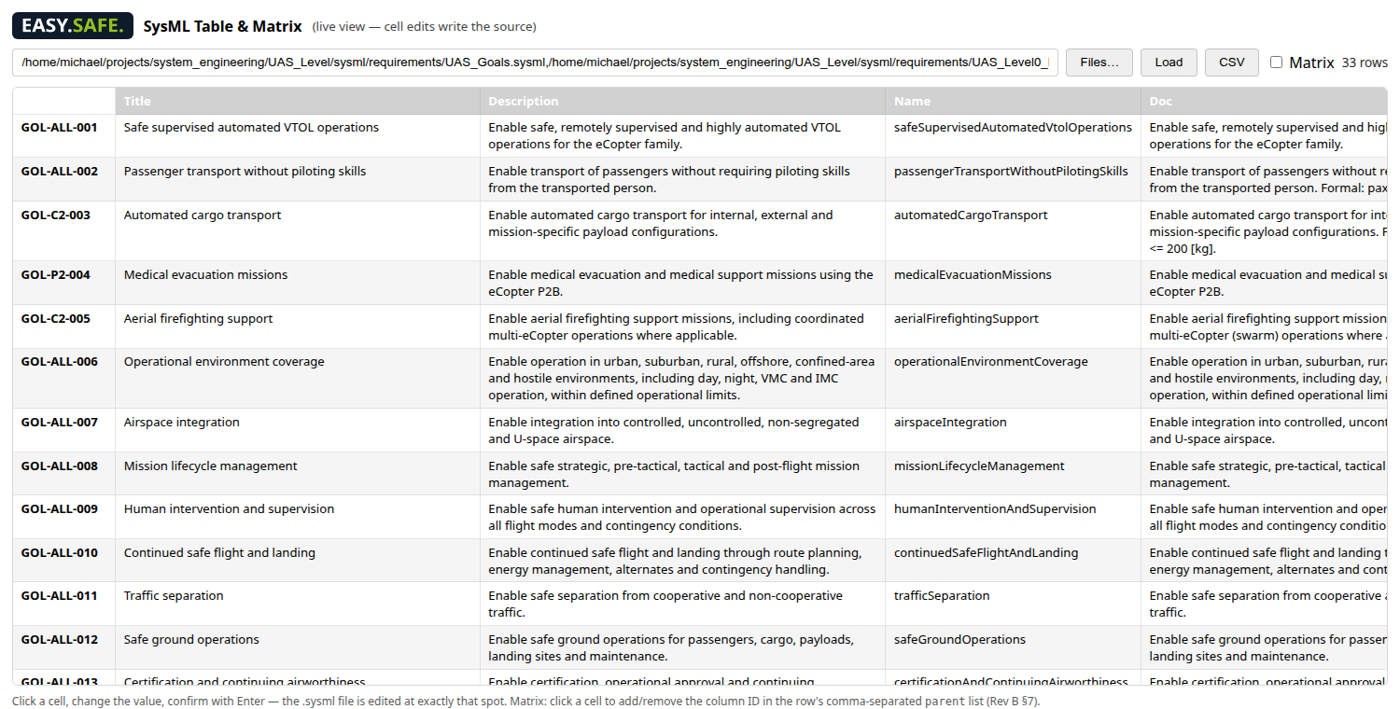
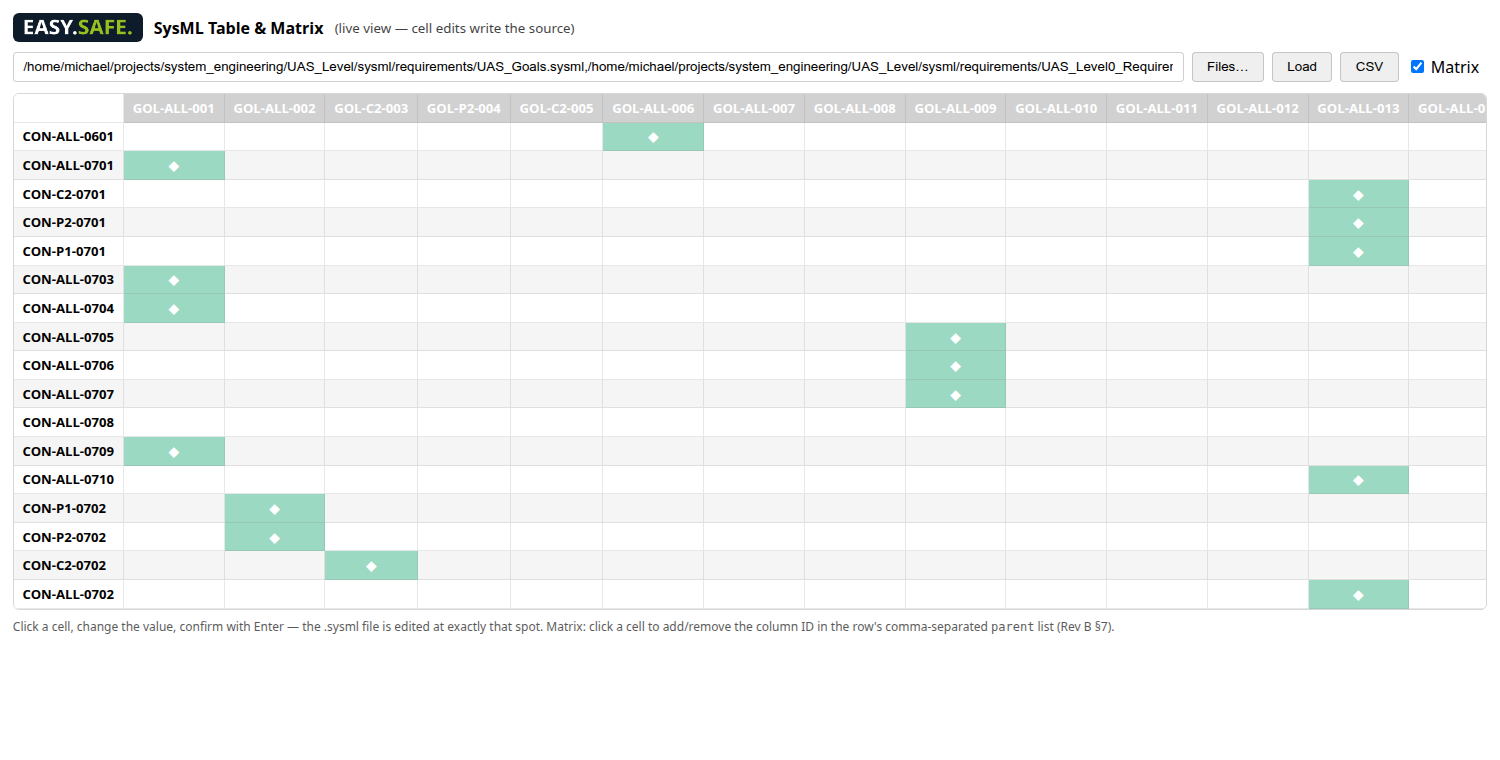
SysML v2 requirement table in VS Code
Live table view of .sysml requirement files – edit a cell, the source file is changed at exactly that spot. CSV export, matrix mode.
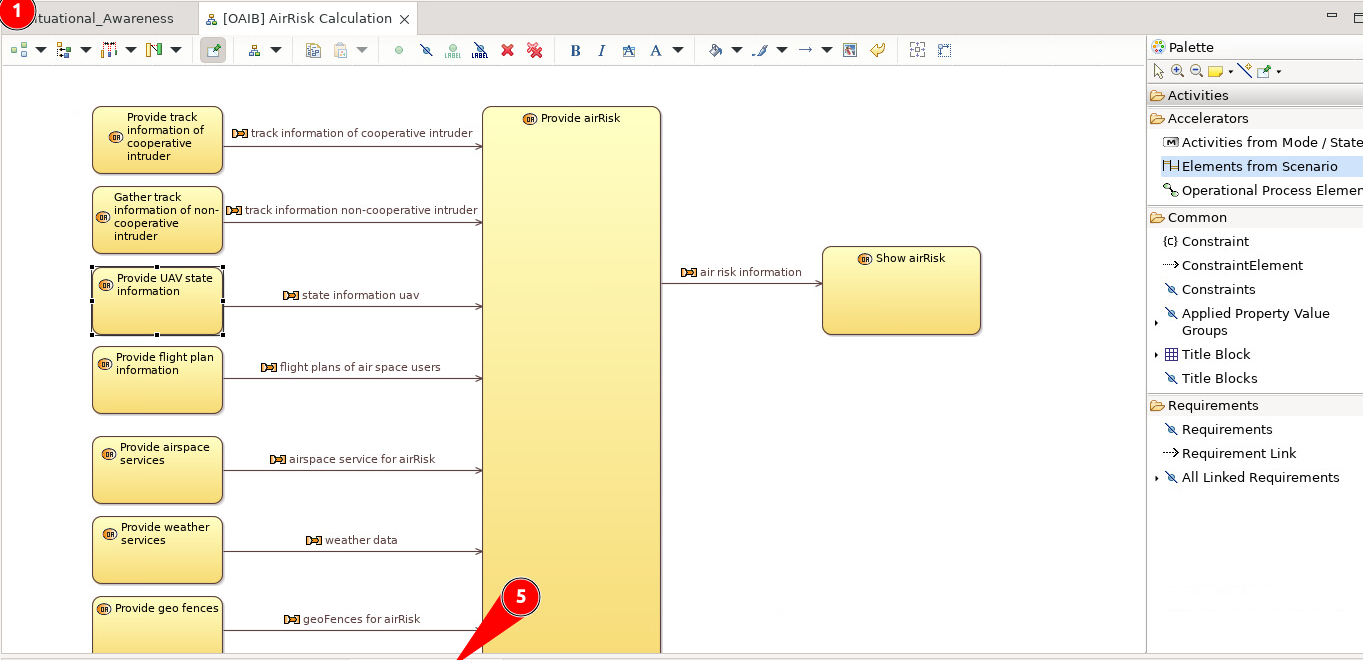
EasySafe requirements and issues inside Capella
EASY.SAFE Requirements and Issues views inside Capella – linked to operational activities, functions and components.
Traceability matrix
Parent/child traceability matrix generated from the SysML v2 files – click a cell to add or remove a link.
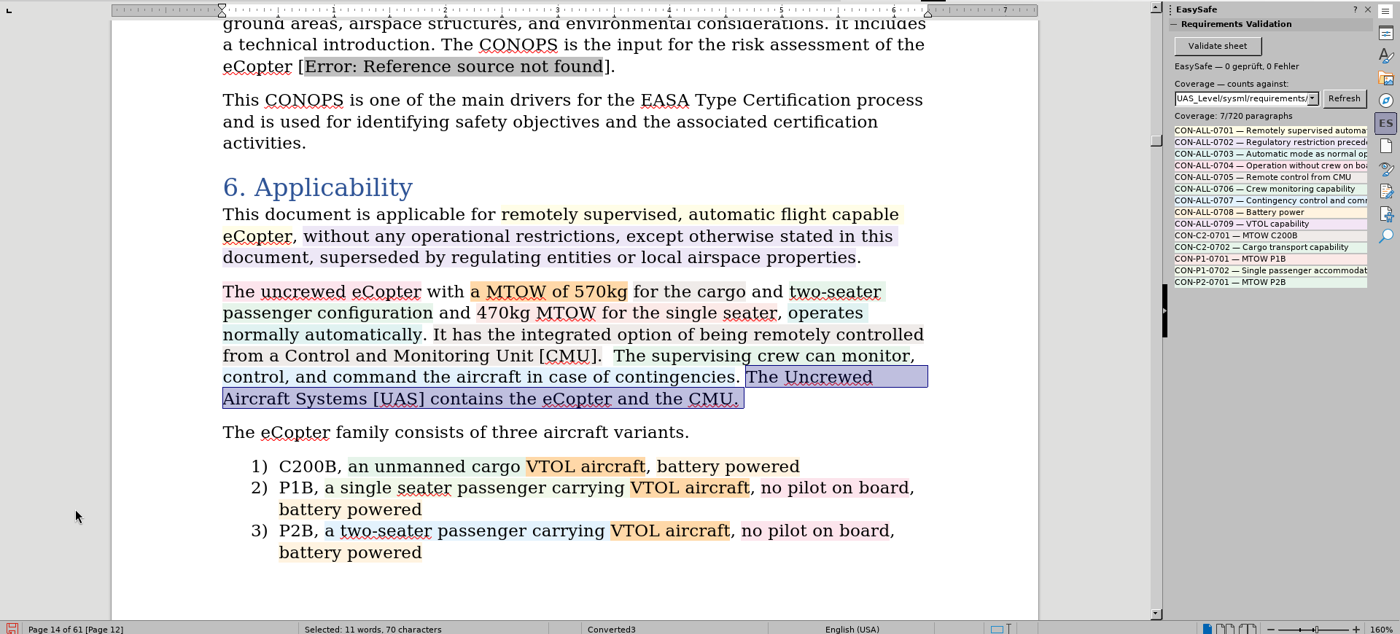
Requirement coverage highlighted in a LibreOffice document
ConOps in LibreOffice: every passage is coloured by the requirement that covers it; the sidebar lists the requirements and the coverage count.
AI

AI-assisted requirements writing

Free text → EARS, derived requirements, explained counterexamples.

AI

AI-assisted MBSE

The AI builds the Capella model from the requirements.

⇄

EasySafe Sync

SysML v2 ⇄ Capella ⇄ LibreOffice · GitHub, Jira, ReqIF.

Integrations & standards

Fits into your toolchain.

Integrations

SysML v2 (native store)Eclipse Capella 7VS CodeReqIFGitHub IssuesJiraExcel IBM DOORS / DOORS NextPolarion · Jama (ReqIF dialects)LibreOffice (document coverage)MS Office add-in

Standards

ISO 26262 (ASIL A–D)IEC 61508 (SIL)DO-178C (DAL A–E)ARP4754B / ARP4761EN 50128IEC 62304ISO 25119ECSS-E-ST-40CMIL-STD-882E
Get started

See your own requirements checked in a 30-minute demo.

Bring your requirements – we check them live.

Request a demo

Deployment: EASY.SAFE Cloud – or the same cloud stack on premises (Docker) · VS Code & Capella clients for Windows and Linux